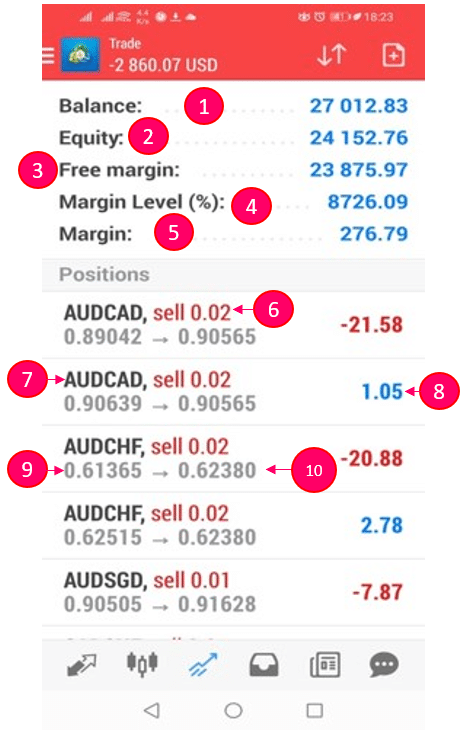
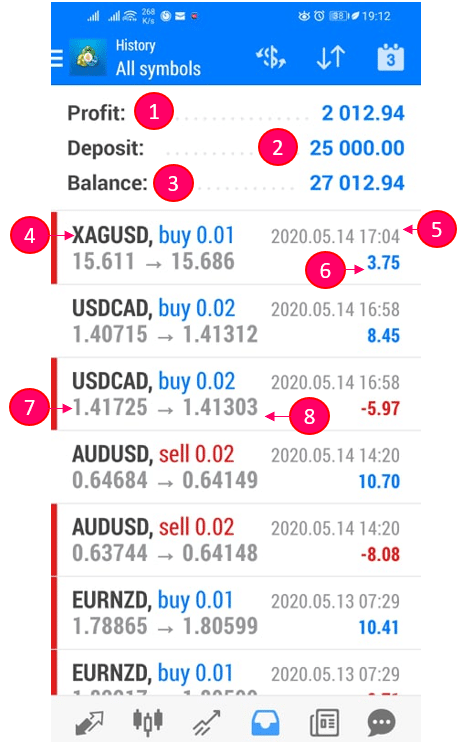
If you have set up your own mobile MT4, there are two important menus you may be interested in:
Total Amount of Funds available in the account.
Actual Amount of Funds available in the account.
Actual Amount of Funds in the account that is not invested.
This indicates the health status of the account. It is recommended to keep a margin level of 1000%
Actual amount of own funds used to invest in the markets excluding leverage
This indicates the volume of currency pairs traded
This shows you the asset you have bought or sold (i.e. AUDCAD). Bought and sold is indicated by BUY or SELL.
This indicates the profit (blue) or losses (red) that are not realized yet. The AI usually waits till the trades goes to profit before closing.
Price at which the asset was bought (buy) or sold (sell).
The Current Price at which the asset is trending. This price is dynamic.
The actual amount realized/earned from the closed trades.
The actual amount funded by the account holder (you) into the trading account.
Assets that was opened and closed at a specified time.
The timestamp shows the exact date and time at which the asset (trade) closed.
This displays the realized profits/losses of the particular asset.
This displays the price at which an asset was bought or sold.
This shows the closing price of the specific asset, at the specific time.
Did this answer your questions?